Snowflake Architecture Explained for Data Engineers
As Data Engineers, we often hear:
“Snowflake is a cloud-native data warehouse.”
But what actually makes Snowflake different from traditional databases?
Why are companies rapidly moving from traditional warehouses to Snowflake?
And why is Snowflake architecture considered one of the biggest innovations in modern Data Engineering?
In this article, we will understand Snowflake architecture in the simplest way possible using:
- real-world examples
- practical understanding
- production use cases
- interview-focused concepts
The Problem with Traditional Data Warehouses
Before understanding Snowflake, we first need to understand the limitations of traditional databases like:
- Oracle
- SQL Server
- Teradata
- On-Prem Data Warehouses
In traditional systems:
- storage and compute are tightly coupled
- scaling becomes expensive
- multiple users create performance bottlenecks
- maintenance becomes difficult
- infrastructure management is complex
Real-Life Example
Imagine a small restaurant kitchen.
The same place is used for:
- cooking food
- storing ingredients
- cleaning utensils
- handling customer rush
Now imagine suddenly 200 customers arrive.
What happens?
- chefs fight for space
- cooking slows down
- deliveries get delayed
- system becomes chaotic
Traditional databases work similarly.
As more users and workloads increase:
- queries become slow
- resources compete with each other
- performance degrades
Snowflake solves this problem using a completely different architecture.
Snowflake Architecture Overview
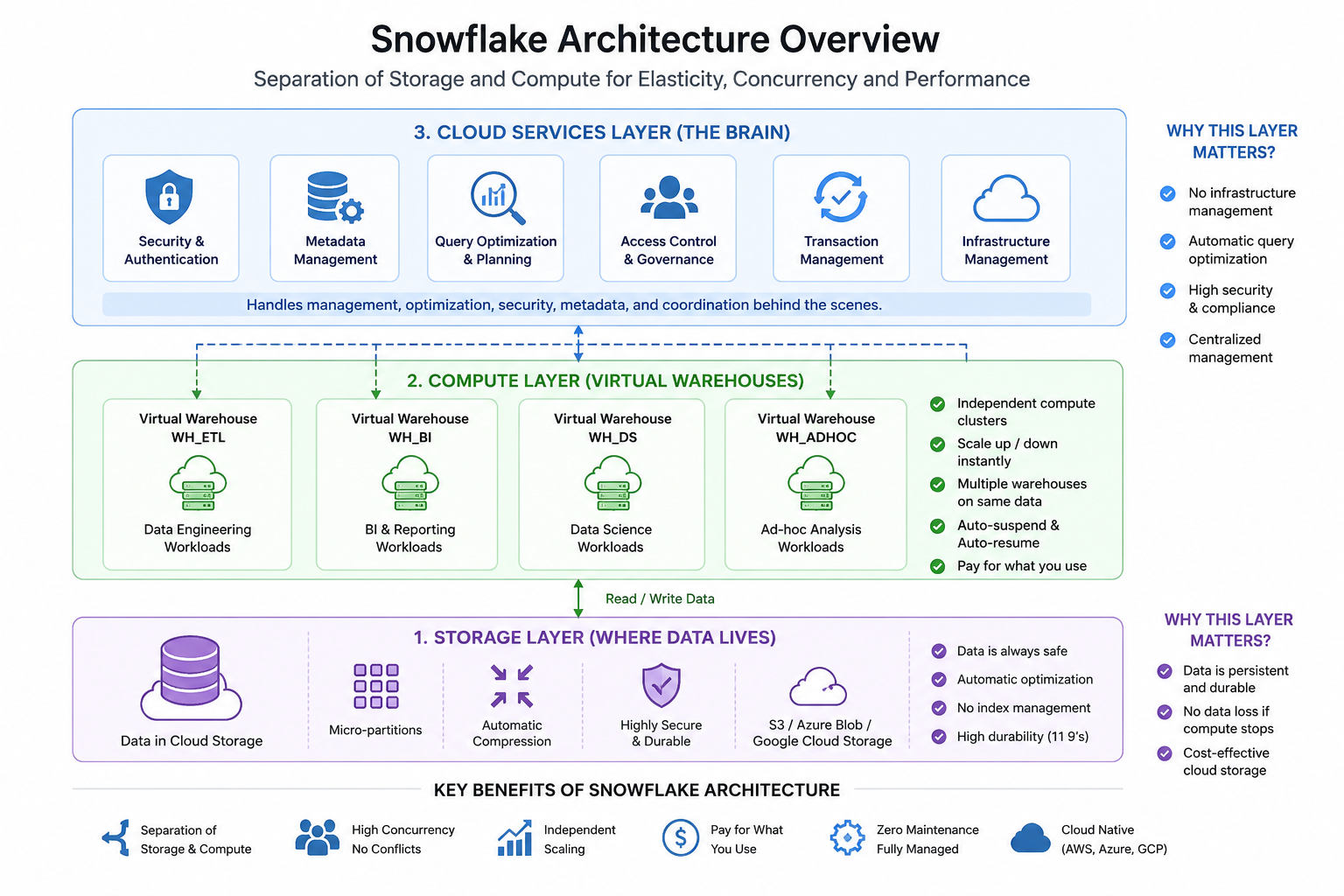
Snowflake architecture has 3 major layers:
- Storage Layer
- Compute Layer (Virtual Warehouses)
- Cloud Services Layer
The biggest innovation is:
All these layers are independent from each other.
This separation makes Snowflake highly scalable, flexible, and cloud-native.
Snowflake Architecture Diagram
1. Storage Layer (Where Data Lives)
This layer stores all your data securely in cloud object storage like:
- Amazon S3
- Azure Blob Storage
- Google Cloud Storage
This layer is fully managed by Snowflake.
Key Features of Storage Layer
- Automatic compression
- Micro-partitioning
- High durability
- Cloud-native storage
- No index management
- Automatic optimization
Snowflake internally organizes data into micro-partitions automatically.
As a Data Engineer, you do not need to manually manage:
- indexes
- storage tuning
- partition maintenance
which reduces operational complexity significantly.
Real-Life Example
Think of this layer as a massive warehouse storage godown.
All goods are safely stored there.
Even if workers stop working temporarily, the goods remain safe.
Similarly in Snowflake:
- data remains stored safely
- even if compute warehouses are shut down
This separation is one of Snowflake’s biggest strengths.
2. Compute Layer (Virtual Warehouses)
The Compute Layer is responsible for executing SQL queries.
Snowflake uses something called:
Virtual Warehouses
A Virtual Warehouse is a cluster of compute resources used to process workloads.
Key Features of Virtual Warehouses
- Independent compute clusters
- Scale up/down anytime
- Multiple warehouses can access same data
- No resource contention
- Auto suspend and auto resume
- Pay only when compute runs
Why This is Powerful
Different teams can use different warehouses simultaneously.
For example:
| Team | Warehouse |
|---|---|
| BI Team | WH_BI |
| Data Engineering Team | WH_ETL |
| Data Science Team | WH_DS |
All teams query the same data independently.
This prevents performance conflicts.
Real-Life Example
Imagine multiple kitchens using the same central storage warehouse.
- Kitchen A → prepares breakfast
- Kitchen B → prepares lunch
- Kitchen C → prepares desserts
All use same ingredients.
But none disturb each other.
Snowflake Virtual Warehouses work exactly like this.
Independent Scaling in Snowflake
One of the biggest advantages of Snowflake is:
Compute and Storage Scale Independently
Traditional systems require scaling everything together.
But in Snowflake:
- storage can grow independently
- compute can scale independently
This improves:
- flexibility
- cost optimization
- concurrency
- workload isolation
Real-Life Example
Suppose:
- your company stores 500 TB data
- but today query load is low
In traditional systems: you still pay for large infrastructure.
In Snowflake: you pay compute only when warehouses are active.
This makes Snowflake highly cost efficient.
3. Cloud Services Layer (The Brain of Snowflake)
This layer manages all coordination activities inside Snowflake.
It handles:
- authentication
- metadata management
- query optimization
- access control
- security
- transaction management
- infrastructure coordination
Real-Life Example
Think of this layer as the restaurant manager.
The manager does not cook food.
But manages:
- customer orders
- chef assignments
- records
- security
- coordination
Similarly, Cloud Services Layer manages everything behind the scenes.
Why Snowflake Architecture is Powerful
1. Separation of Storage and Compute
This is Snowflake’s biggest innovation.
Benefits:
- better scalability
- workload isolation
- improved concurrency
- cost optimization
2. High Concurrency
Multiple teams can run workloads simultaneously without slowing each other down.
This is extremely important in enterprise environments.
3. Auto Scaling
Warehouses can scale dynamically based on workload.
No manual infrastructure management required.
4. Pay for What You Use
Compute cost is charged only when warehouses are active.
This helps organizations optimize cloud costs significantly.
5. Minimal Maintenance
Snowflake handles:
- indexing
- tuning
- optimization
- compression
- partitioning
automatically.
This reduces operational burden for Data Engineers.
6. Cloud Native Architecture
Snowflake works across:
- AWS
- Azure
- Google Cloud Platform
This provides flexibility for enterprises.
Real-World Enterprise Example
Suppose a marketing analytics company uses Snowflake.
Different teams perform different operations:
| Team | Activity |
|---|---|
| Data Engineers | ETL Pipelines |
| Analysts | Dashboard Queries |
| Data Scientists | ML Feature Analysis |
| Business Users | Ad-hoc Reporting |
All teams use separate virtual warehouses.
Benefits:
- no performance conflicts
- faster execution
- independent scaling
- better workload management
This is one of the biggest reasons Snowflake became highly popular in enterprises.
Snowflake Architecture Interview Questions
-
Why does Snowflake separate storage and compute?
-
What are Virtual Warehouses in Snowflake?
-
What is the role of Cloud Services Layer?
-
How does Snowflake handle concurrency?
-
Difference between traditional warehouse and Snowflake architecture?
-
What are the benefits of independent scaling?
-
What is workload isolation in Snowflake?
-
Why is Snowflake considered cloud-native?
-
What are micro-partitions in Snowflake?
-
How does Snowflake optimize query performance?
-
What happens when multiple users query same data simultaneously?
-
How does auto suspend help reduce cost?
-
Why is Snowflake architecture highly scalable?
-
How does Snowflake manage metadata?
-
Why is maintenance easier in Snowflake compared to traditional databases?
Common Mistakes Beginners Make
Many beginners focus only on SQL syntax in Snowflake.
But in real interviews, companies focus heavily on:
- architecture understanding
- scaling concepts
- warehouse behavior
- concurrency handling
- optimization thinking
- real-world use cases
Understanding architecture deeply helps you become a stronger Data Engineer.
As a Data Engineer, understanding these concepts deeply is extremely important because architecture questions are very common in Snowflake interviews.
What’s Next?
In the next article, we will explore:
Horizontal vs Vertical Scaling in Snowflake
including:
- warehouse scaling
- concurrency scaling
- cost optimization
- real-world scenarios
- interview-focused concepts
because scaling is one of the most important Snowflake concepts in enterprise Data Engineering.
Suggested Practice
After reading this article, try exploring:
- creating virtual warehouses
- warehouse scaling
- auto suspend settings
- query history
- warehouse monitoring
inside Snowflake UI to understand these concepts practically.